Recoverable Displacement Range
Simple Stretch raised a natural follow-up
question: how far can astronaut0 be stretched, or compressed, before
locate stops finding the exact expected position? The investigation
that followed didn't answer that question directly. It found something
more fundamental first — a real, silent bug in locate itself, now
fixed. This page chronicles how.
The First Sweep
The rest of this page traces a real, silent bug in locate: the kernel
content it correlates against gets padded asymmetrically, capping how
far a point can move and still be found. Here it is, directly. A point
at px, a 60x60 px kernel (kernel_margin = 30), moved by
a series of dx values, tracked with a deliberately pre-fix version of
locate.
locate_uncentered —
introduced properly, with the reasoning behind it, in Isolating the
Real Variable below — reproduces exactly
the padding this page's real, shipped locate no longer has. The fixed
version wouldn't reproduce this collapse at all:
from dictk.image import PixelCoordinate, read, translate
from recoverable_displacement_range_uncentered_demo import locate_uncentered

reference_image = read(path="astronaut0.png")
p0 = PixelCoordinate(x=150, y=150)
kernel_margin = 30
search_margin = 150  # generous -- per Root Cause, size won't help here --
# and exactly half of astronaut0's 300px canvas, so the search reads the
# whole image with no extraction margin of its own

for dx in [0, 10, 20, 25, 29, 30, 31, 35, 40, 50]:
    current_image = translate(arr=reference_image, dx=dx, dy=0)
    expected = PixelCoordinate(x=p0.x + dx, y=p0.y)
    found = locate_uncentered(reference_image, current_image, p0, p0, kernel_margin, search_margin)
    print(f"dx={dx}  expected={expected}  found={found}  match={found == expected}")
expected/found below appear in two reference frames side by side:
current_image's own absolute frame (what locate_uncentered actually
returns, same as the code above), and the local frame of search
itself -- labeled "Fixed Image, frame ", matching Seeing
the Cliff's quadrant figures just below exactly.
expected there always equals the correlation surface's own true peak
(that section's yellow box); found always equals what
locate_uncentered actually reports (its magenta box):
| dx | current_image (absolute) | Fixed Image, frame | match | ||
|---|---|---|---|---|---|
| expected | found | expected | found | ||
| 0 | (150,150) | (150,150) | (120,120) | (120,120) | True |
| 10 | (160,150) | (160,150) | (130,120) | (130,120) | True |
| 20 | (170,150) | (170,150) | (140,120) | (140,120) | True |
| 25 | (175,150) | (175,150) | (145,120) | (145,120) | True |
| 29 | (179,150) | (179,150) | (149,120) | (149,120) | True |
| 30 | (180,150) | (180,150) | (150,120) | (150,120) | True |
| 31 | (181,150) | (-119,150) | (151,120) | (-149,120) | False |
| 35 | (185,150) | (-115,150) | (155,120) | (-145,120) | False |
| 40 | (190,150) | (-110,150) | (160,120) | (-140,120) | False |
| 50 | (200,150) | (-100,150) | (170,120) | (-130,120) | False |
A sharp cliff, right at dx = kernel_margin + 1. search_margin = 150
— five times kernel_margin — makes no difference past that point at
all. The rest of this page explains why, and fixes it.
Seeing the Cliff
The correlation surface behind this is never actually wrong -- its own
peak lands at the correct position for both dx = 30 and dx = 31,
confirmed separately. The bug is downstream: locate_uncentered's
skimage-based conversion of that surface into a signed shift, which
misreads the answer only past the cliff. recoverable_displacement_range_first_sweep_quadrant.py
marks both positions on the same Fixed Image panel
phase_correlation_quadrant_plot
already draws elsewhere in this book -- the surface's own true peak
(yellow, dashed, unchanged from every other use of that function) and
where locate_uncentered actually reports the point (magenta). search
here reads the entire astronaut0 canvas -- search_margin = 150 is
exactly half its 300px width -- so the extraction itself adds no black
margin of its own; the only black left is dx's own left-side gap from
shifting the image right:
Saved: recoverable_displacement_range_first_sweep_quadrant_dx30.png
Saved: recoverable_displacement_range_first_sweep_quadrant_dx31.png
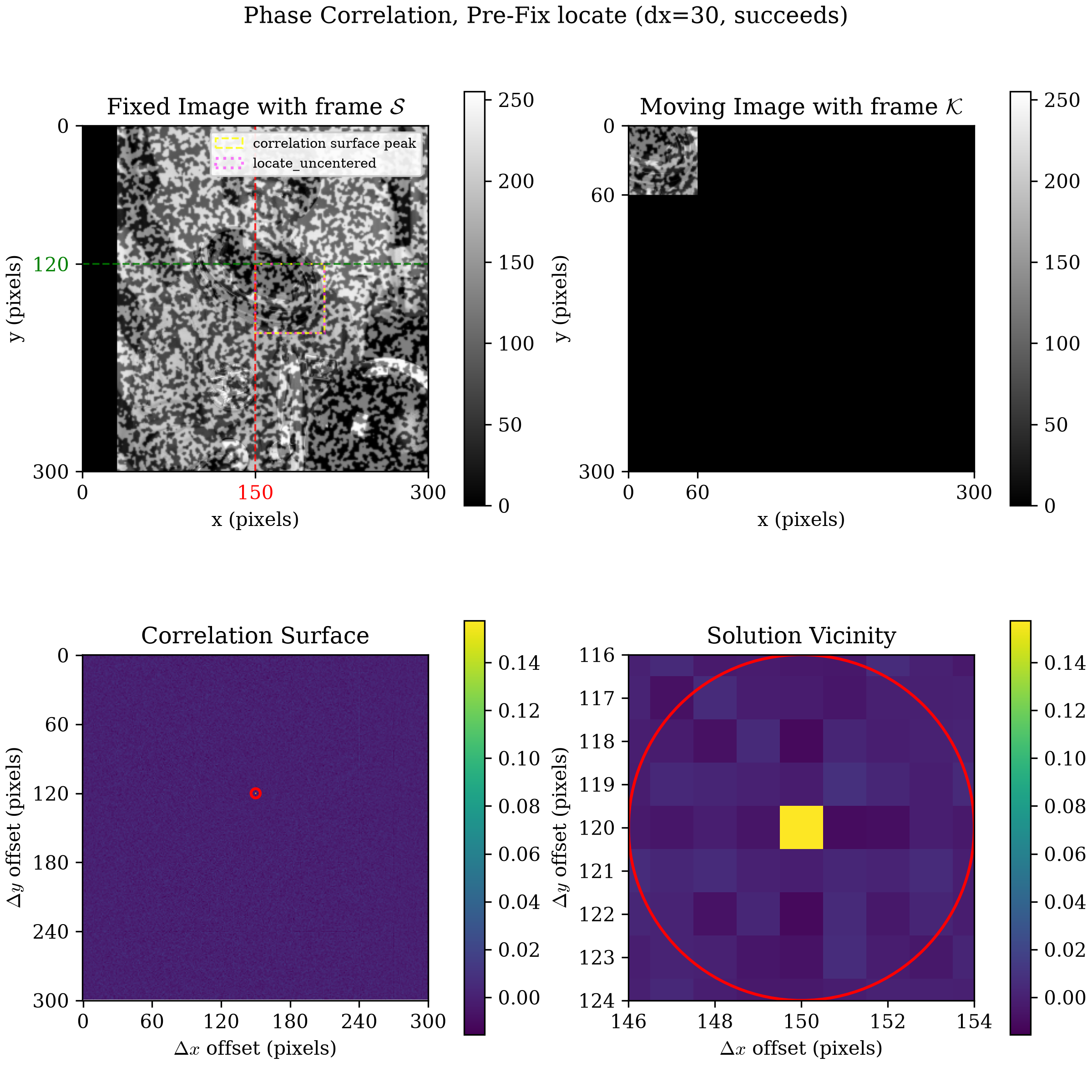
dx = 30: the black margin on the left is exactly 30px wide -- dx itself, visible directly, not just computed. The two boxes coincide: locate_uncentered reports the same position the surface actually peaks at.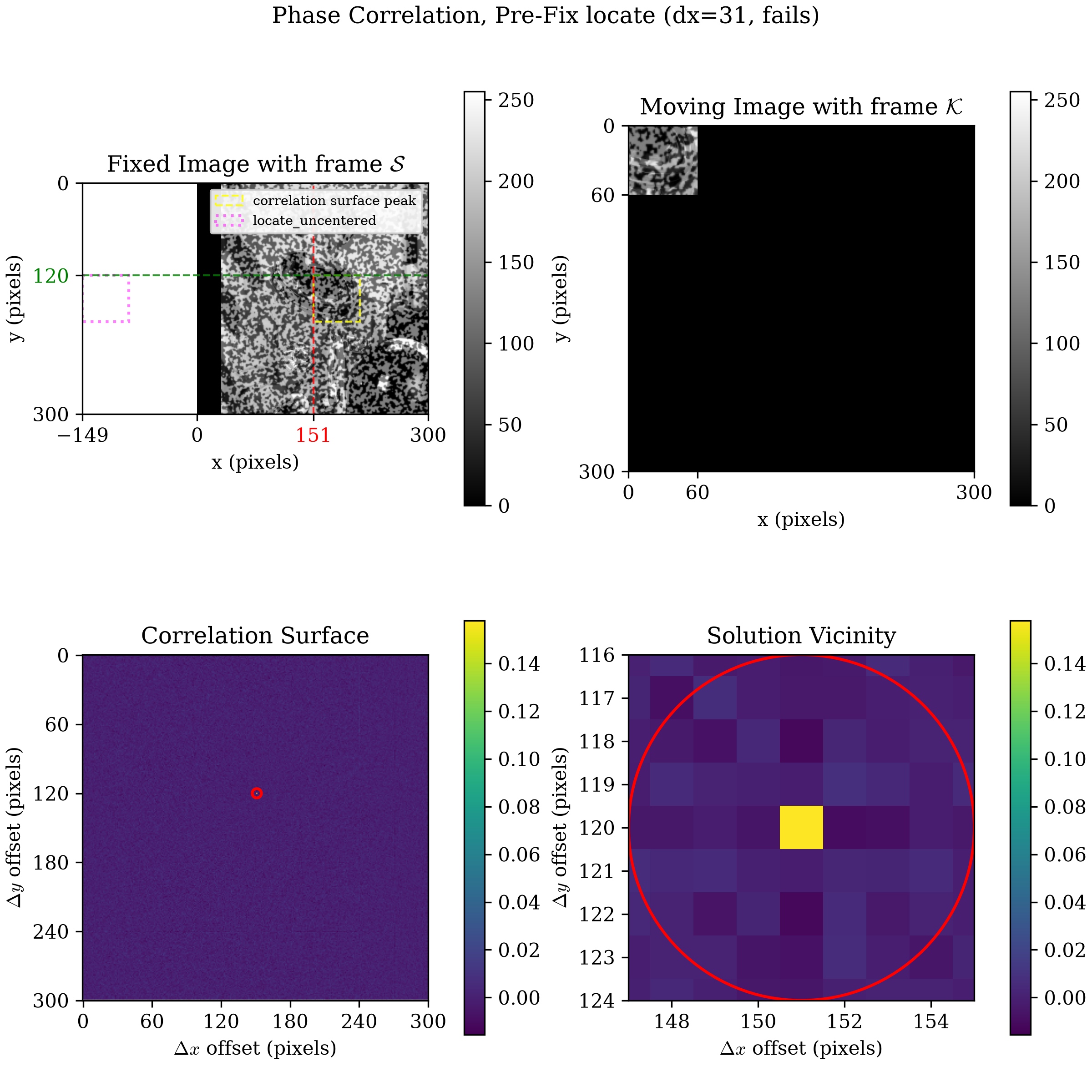
dx = 31: the yellow box still marks the surface's true (correct) peak. The magenta box -- where locate_uncentered actually reports the point -- lands entirely outside the visible search frame, off by exactly the padded array's own width.Fixing locate
recoverable_displacement_range_fixing_locate.py
(full source at the bottom of this page) re-runs The First Sweep's
exact scenario and dx values against the real, shipped
dictk.translation.locate --
not locate_uncentered -- before this page walks through why the fix
was needed. Same two reference frames as The First Sweep's own table
above:
| dx | current_image (absolute) | Fixed Image, frame | match | ||
|---|---|---|---|---|---|
| expected | found | expected | found | ||
| 0 | (150,150) | (150,150) | (120,120) | (120,120) | True |
| 10 | (160,150) | (160,150) | (130,120) | (130,120) | True |
| 20 | (170,150) | (170,150) | (140,120) | (140,120) | True |
| 25 | (175,150) | (175,150) | (145,120) | (145,120) | True |
| 29 | (179,150) | (179,150) | (149,120) | (149,120) | True |
| 30 | (180,150) | (180,150) | (150,120) | (150,120) | True |
| 31 | (181,150) | (181,150) | (151,120) | (151,120) | True |
| 35 | (185,150) | (185,150) | (155,120) | (155,120) | True |
| 40 | (190,150) | (190,150) | (160,120) | (160,120) | True |
| 50 | (200,150) | (200,150) | (170,120) | (170,120) | True |
Every row matches now, cliff included.
recoverable_displacement_range_fixing_locate_quadrant.py
draws dx = 31 -- the cliff itself -- the same way Seeing the Cliff
did, but with centered=True:
phase_correlation_quadrant_plot
pads the Moving Image panel's kernel the same way locate now does
internally, instead of the permanent bottom-right-only padding
phase_correlation itself always keeps. Compare the two Moving Image
panels directly: Seeing the Cliff's dx = 31
figure shows the kernel's content pinned to the
top-left corner of an otherwise-black canvas; this one shows the exact
same content centered within it, black on all four sides evenly. That
single difference is the entire fix:
Saved: recoverable_displacement_range_fixing_locate_quadrant_dx31.png
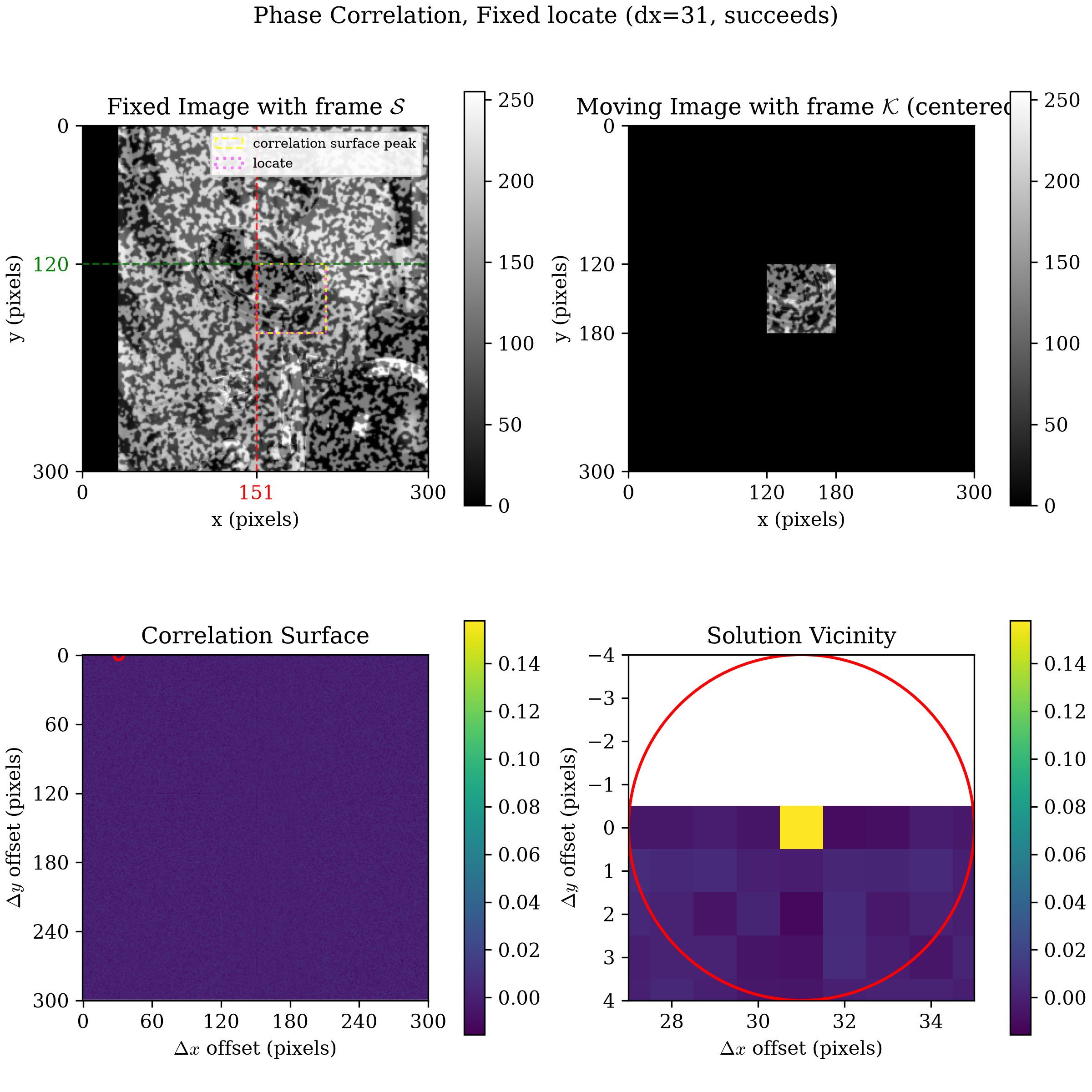
dx = 31, post-fix. The Moving Image panel's kernel content is centered, not pinned to the top-left corner -- compare directly against Seeing the Cliff's dx = 31 figure above. On the Fixed Image panel, the two boxes coincide again: locate now reports the same position the surface actually peaks at, past the old cliff.The rest of this page takes a step back and walks through the investigation in full -- the hypotheses that turned out not to explain it, the confound that had to be set aside, isolating the real variable, and exactly why the kernel's padding needed to be centered to fix this.
The Original Stretch Question
That cliff is the real bug this page fixes, but it isn't how the
investigation actually started. It began from a different angle:
Simple Stretch's own question, how far can
astronaut0 be stretched, or compressed, before locate stops finding
the exact expected position? Reuse Point
Grid's 12 points and sweep
factor_x upward, sizing search_margin_width per factor so it always
comfortably contains the largest point's displacement — wide enough
that "the window was too small" can't explain a failure:
from dictk.image import read, stretch, PixelCoordinate
from dictk.grid import generate, locate

reference_image = read(path="astronaut0.png")
points = generate(
    origin=PixelCoordinate(x=50, y=50), count_x=3, count_y=4, spacing_x=50, spacing_y=55
)
kernel_margin = 20

for p in [2, 4, 6, 8, 18, 20, 40, 80]:
    factor_x = 1 + p / 100
    current_image = stretch(arr=reference_image, factor_x=factor_x)
    max_disp = max(abs(pt.x * (factor_x - 1)) for pt in points)
    search_margin_width = max(int(max_disp) + 15, kernel_margin + 10)
    found = locate(
        reference_image=reference_image, current_image=current_image, reference_points=points,
        kernel_margin_width=kernel_margin, kernel_margin_height=kernel_margin,
        search_margin_width=search_margin_width, search_margin_height=52,
    )
    expected = [PixelCoordinate(x=int(pt.x * factor_x), y=pt.y) for pt in points]
    n_match = sum(1 for f, e in zip(found, expected) if f == e)
    print(f"{p:3d}%  search_margin_width={search_margin_width:4d}  matched={n_match:2d}/12")
| Stretch | factor_x | search_margin_width | Matched |
|---|---|---|---|
| 2% | 1.02 | 30 | 12/12 |
| 4% | 1.04 | 30 | 12/12 |
| 6% | 1.06 | 30 | 10/12 |
| 8% | 1.08 | 30 | 6/12 |
| 18% | 1.18 | 41 | 1/12 |
| 20% | 1.20 | 44 | 1/12 |
| 40% | 1.40 | 74 | 0/12 |
| 80% | 1.80 | 135 | 0/12 |
Matching collapses almost immediately — well before 20% stretch. That's surprising: at this book's own 40-pixel kernel scale, a real degradation-driven failure shouldn't set in this early.
This table already runs against locate's real, fixed version — it's
live, re-run on every book build. Path
Forward already checked whether the fix
above changed it, and it doesn't: search_margin_width here is always
sized larger than the true displacement, so this sweep never actually
hits the cliff bug The First Sweep demonstrated. Something else
explains this particular collapse.
Two Hypotheses, Both Ruled Out
Two mechanisms seemed possible: blur or canvas exit.
Hypothesis 1: Blur
stretch uses bilinear interpolation, sampling an increasingly small
crop of the original image to fill the same canvas. Whole-image
contrast does drop as factor_x grows — but only mildly, from a
standard deviation of 63.8 at factor_x=1.0 to 58.1 even at
factor_x=3.0. Not a collapse.
That claim is a whole-image statistic. Seeing it directly, side by side with the image it's measuring, makes it concrete rather than just asserted:
import matplotlib.pyplot as plt
from dictk.image import read, stretch

reference_image = read(path="astronaut0.png")
factors = [1.0, 1.5, 2.0, 3.0]

plt.rcParams.update({"font.family": "serif", "mathtext.fontset": "cm"})
fig, axes = plt.subplots(2, len(factors), figsize=(11, 5.8), constrained_layout=True)
for col, factor_x in enumerate(factors):
    img = stretch(arr=reference_image, factor_x=factor_x)
    mean, std = img.mean(), img.std()

    axes[0, col].imshow(img, cmap="gray", vmin=0, vmax=255)
    axes[0, col].set_title(f"factor_x={factor_x:.1f}\nstd={std:.1f}", fontsize=10)
    axes[0, col].set_xticks([])
    axes[0, col].set_yticks([])

    ax_hist = axes[1, col]
    counts, _, _ = ax_hist.hist(img.ravel(), bins=50, range=(0, 255), color="black", alpha=0.7)
    y_bracket = counts.max() * 1.12
    ax_hist.axvline(mean - std, color="tab:red", linestyle="--", linewidth=1)
    ax_hist.axvline(mean + std, color="tab:red", linestyle="--", linewidth=1)
    ax_hist.annotate(
        "",
        xy=(mean - std, y_bracket),
        xytext=(mean + std, y_bracket),
        arrowprops=dict(arrowstyle="<->", color="tab:red"),
    )
    ax_hist.text(mean, y_bracket * 1.06, f"±1 std = {std:.1f}", ha="center", va="bottom", fontsize=8, color="tab:red")
    ax_hist.set_ylim(0, y_bracket * 1.35)
    ax_hist.set_xlim(0, 255)
    ax_hist.set_xlabel("pixel value", fontsize=8)
fig.savefig("recoverable_displacement_range_blur.png", dpi=300)
Saved: recoverable_displacement_range_blur.png
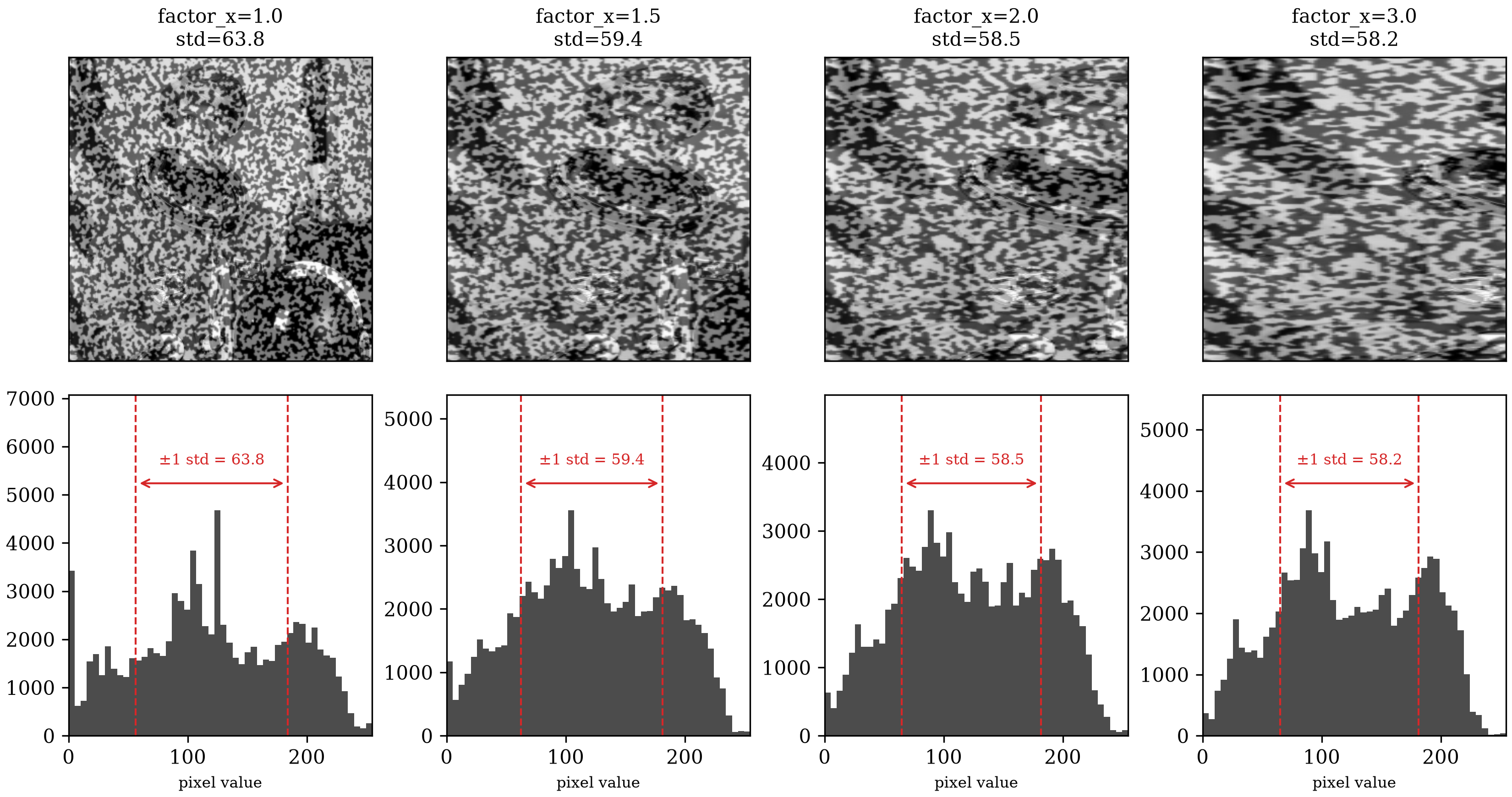
astronaut0 stretched at four factors. Bottom: each one's own pixel-value histogram, with a red bracket marking the ±1 standard deviation span. The images show where the blur comes from — horizontal streaking, since stretch only resamples along — but the bracket confirms it's mild: the span narrows only slightly as standard deviation drops from 63.8 to 58.2, nowhere near the collapse the first sweep showed at just 6-8%.There's also a theoretical reason this mild blur shouldn't move the peak
at all. locate's phase normalization
divides out signal strength at every frequency and keeps only direction.
Blurring changes strength, not direction — the same property that already
makes locate insensitive to contrast. Only heavy blur eventually breaks
that guarantee in practice, since real images pad and round at their
edges instead of matching the idealized math exactly. stretch never
reaches that regime at these factors.
Hypothesis 2: Canvas Exit
stretch pivots at the origin, so a point far enough from it can be
pushed past the image's fixed 300-pixel edge. For (this grid's
maximum dimension) that doesn't happen until factor_x=2.0 — 100%
stretch, long after the matching collapse above.
Plotting that point's expected position directly on each stretched image makes the exit itself visible, not just computed:
import matplotlib.pyplot as plt
from dictk.image import read, stretch

reference_image = read(path="astronaut0.png")
height, width = reference_image.shape
p_x, p_y = 150, 50  # the grid's farthest point from the origin
factors = [1.0, 1.5, 2.0, 2.5]

plt.rcParams.update({"font.family": "serif", "mathtext.fontset": "cm"})
fig, axes = plt.subplots(1, len(factors), figsize=(11, 3.4), constrained_layout=True)
for ax, factor_x in zip(axes, factors):
    img = stretch(arr=reference_image, factor_x=factor_x)
    x_expected = p_x * factor_x
    on_canvas = x_expected < width

    ax.imshow(img, cmap="gray", vmin=0, vmax=255, extent=[0, width, height, 0])
    ax.axvline(width, color="tab:red", linestyle="--", linewidth=1)
    ax.plot(x_expected, p_y, marker="+", color="tab:orange", markersize=10, markeredgewidth=2.5)
    ax.set_xlim(-20, 400)
    ax.set_ylim(height + 20, -20)
    status = "on canvas" if on_canvas else "OFF CANVAS"
    ax.set_title(f"factor_x={factor_x:.1f}\nx={x_expected:.0f}  ({status})", fontsize=10)
    ax.set_xticks([])
    ax.set_yticks([])
fig.savefig("recoverable_displacement_range_canvas_exit.png", dpi=300)
Saved: recoverable_displacement_range_canvas_exit.png
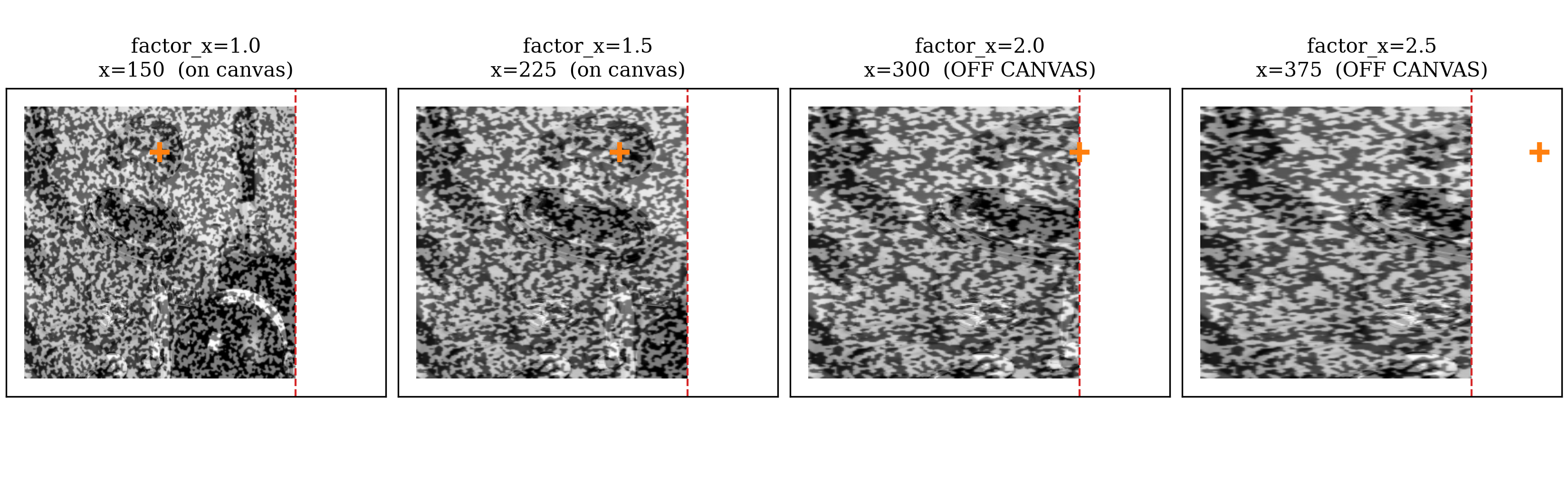
factor_x=2.0 — the threshold the text above states — and floats clearly outside the image by factor_x=2.5. That threshold sits far past the collapse the first sweep showed at just 6-8%, ruling canvas exit out too.Neither blur nor canvas exit explains a collapse at 6-8%. Something else is going on, and it isn't image degradation.
An Interpolation Confound, Set Aside
Chasing the real cause directly through stretch turned out to be the
wrong tool: even at a percentage chosen so a point's center pixel
lands on an exact integer, bilinear interpolation still resamples
every other pixel in that point's kernel from a fractional source
coordinate. The center matches; the kernel's surrounding texture is
subtly blurred anyway, in a way that grows with factor_x. That's a
real phenomenon — related to Path Forward's Postponed subpixel-accuracy
item — but a second, separate one from
whatever is causing the sharp, early collapse above. Isolating the real
cause means removing this confound entirely: pure integer-pixel
translate instead of stretch,
where every pixel maps from an exact integer source coordinate and
bilinear interpolation never activates at all.
Isolating the Real Variable
Consider a point in the reference configuration with coordinate px in astronaut0.
It moves a displacement of px — 10 px
to the right — landing at px in the current configuration.
Now consider four kernel margins ( px, small to large)
and, for each one, two search margins (kernel_margin + 15 and
kernel_margin + 80 px) — eight combinations in total.
- Question: Does the ratio of kernel size to search-window size explain anything?
- Answer: It does not.
All eight combinations find the exact expected point — from a comfortable ratio of 0.67 down to a razor-thin 0.10:
from dictk.image import read, translate, PixelCoordinate
from dictk.translation import locate

reference_image = read(path="astronaut0.png")
p0 = PixelCoordinate(x=150, y=150)
dx = 10
current_image = translate(arr=reference_image, dx=dx, dy=0)
expected = PixelCoordinate(x=p0.x + dx, y=p0.y)

for kernel_margin in [15, 20, 25, 30]:
    for search_margin in [kernel_margin + 15, kernel_margin + 80]:
        found = locate(
            reference_image=reference_image, current_image=current_image,
            reference_point=p0, search_center=p0,
            kernel_margin_width=kernel_margin, kernel_margin_height=kernel_margin,
            search_margin_width=search_margin, search_margin_height=search_margin,
        )
        ratio = kernel_margin / search_margin
        print(f"kernel_margin={kernel_margin:2d}  search_margin={search_margin:3d}  ratio={ratio:.2f}  match={found == expected}")
| kernel_margin | search_margin | ratio | match |
|---|---|---|---|
| 15 | 30 | 0.50 | True |
| 15 | 95 | 0.16 | True |
| 20 | 35 | 0.57 | True |
| 20 | 100 | 0.20 | True |
| 25 | 40 | 0.62 | True |
| 25 | 105 | 0.24 | True |
| 30 | 45 | 0.67 | True |
| 30 | 110 | 0.27 | True |
Ratio genuinely doesn't matter. But, raw displacement does matter.
locate compares that raw displacement against kernel_margin alone.
search_margin plays no role here, no matter how large it is.
The rest of this section demonstrates that failure directly, using
recoverable_displacement_range_uncentered_demo.py,
a Python script listed at the bottom of this page. That script
contains a (now understood to be buggy) version of locate, called
locate_uncentered. It calls _kernel_pad(..., centered=False), where the
centered=False is the crucial bug-inducing parameter. This
script exists because the real, shipped locate has already been
fixed to center-pad the kernel. It would no longer reproduce the
cliff bug, shown next.
Consider again a point in the reference configuration at px.
Let kernel_margin = 30 px, a reasonable size.
Let search_margin = 180 px, a generous size (and this size shouldn't matter, per the result above).
Now investigate a series of dx values: kernel_margin ,
which is . Each dx produces one candidate current
configuration. The (right-hand side) cliff appears the moment dx crosses one pixel past
kernel_margin, at kernel_margin . There, the found location is
predicted at px, not the expected px value.
The tabular output from recoverable_displacement_range_uncentered_demo.py follows:
| dx | kernel_margin offset | expected | found | match |
|---|---|---|---|---|
| 27 | -3 | (177,150) | (177,150) | True |
| 29 | -1 | (179,150) | (179,150) | True |
| 30 | +0 | (180,150) | (180,150) | True |
| 31 | +1 | (181,150) | (-179,150) | False |
| 33 | +3 | (183,150) | (-177,150) | False |
A sharp (right-side) cliff, exactly at dx == kernel_margin. The search_margin=180,
six times larger than kernel_margin, makes no difference at all.
Root Cause
dictk.translation.locate
zero-pads the kernel up to the search area's own size before the FFT
(see Correlation Criteria).
Until this page, that padding placed the kernel's real content at the
padded array's top-left corner — everything else, zero. FFT-based phase
correlation is circular: the shift it reports is only meaningful modulo
the array's own size, wrapping silently past that.
With the kernel
anchored at the corner instead of centered, the safe half of that
circle landed almost entirely on the negative side. The positive side
had almost none of it to spare — capped at exactly kernel_margin,
regardless of how large search_margin was set. Past that cap, locate
didn't fail visibly. It confidently returned a wrong PixelCoordinate,
offset from the true one by exactly the padded array's own width.
The Fix
Now let's use the fixed (updated/shipped) version of locate, which
centers the kernel's content within the padded array.
Consider again a point with reference configuration px.
Let kernel_margin = 30 and let search_margin = 45.
The recoverable range is now symmetric, bounded by search_margin in
both directions, exactly as the parameter's own name implies it
always should have been:
| dx | expected | found | match |
|---|---|---|---|
| 30 | (180,150) | (180,150) | True |
| 40 | (190,150) | (190,150) | True |
| 44 | (194,150) | (194,150) | True |
| 45 | (195,150) | (195,150) | True |
| 46 | (196,150) | (106,150) | False |
| -44 | (106,150) | (106,150) | True |
| -45 | (105,150) | (195,150) | False |
We now have success right up to the search_margin on the right:
- With
dx = 45,locatesuccessfully finds the correct value. - With
dx = 46,locatecycles back thesearch_margin, px, predicting , not the expected .
Similarly, on the left side of the search_margin:
- With
dx = -44,locatesuccessfully finds the correct value. - With
dx = -45,locatecycles forward thesearch_margin, px, predicting , not the expected .
Look closely at dx = 45 and dx = -45. One succeeds; the other fails.
That is not a contradiction of the symmetry claimed above — it is a
single, unavoidable edge case. In this circular system, and
land on the exact same point: they are px apart, and px is
the whole width of the padded array. locate cannot tell them apart.
It must pick one interpretation, and it happens to pick the positive
one. This one-pixel ambiguity is a property of representing a circle
with discrete arithmetic. It is not a bug.
The whole picture — point, kernel, search window, and the two
positions one pixel past the edge where locate wraps — drawn by
recoverable_displacement_range_the_fix_cliff.py
(full source at the bottom of this page):
Saved: recoverable_displacement_range_the_fix_cliff.png
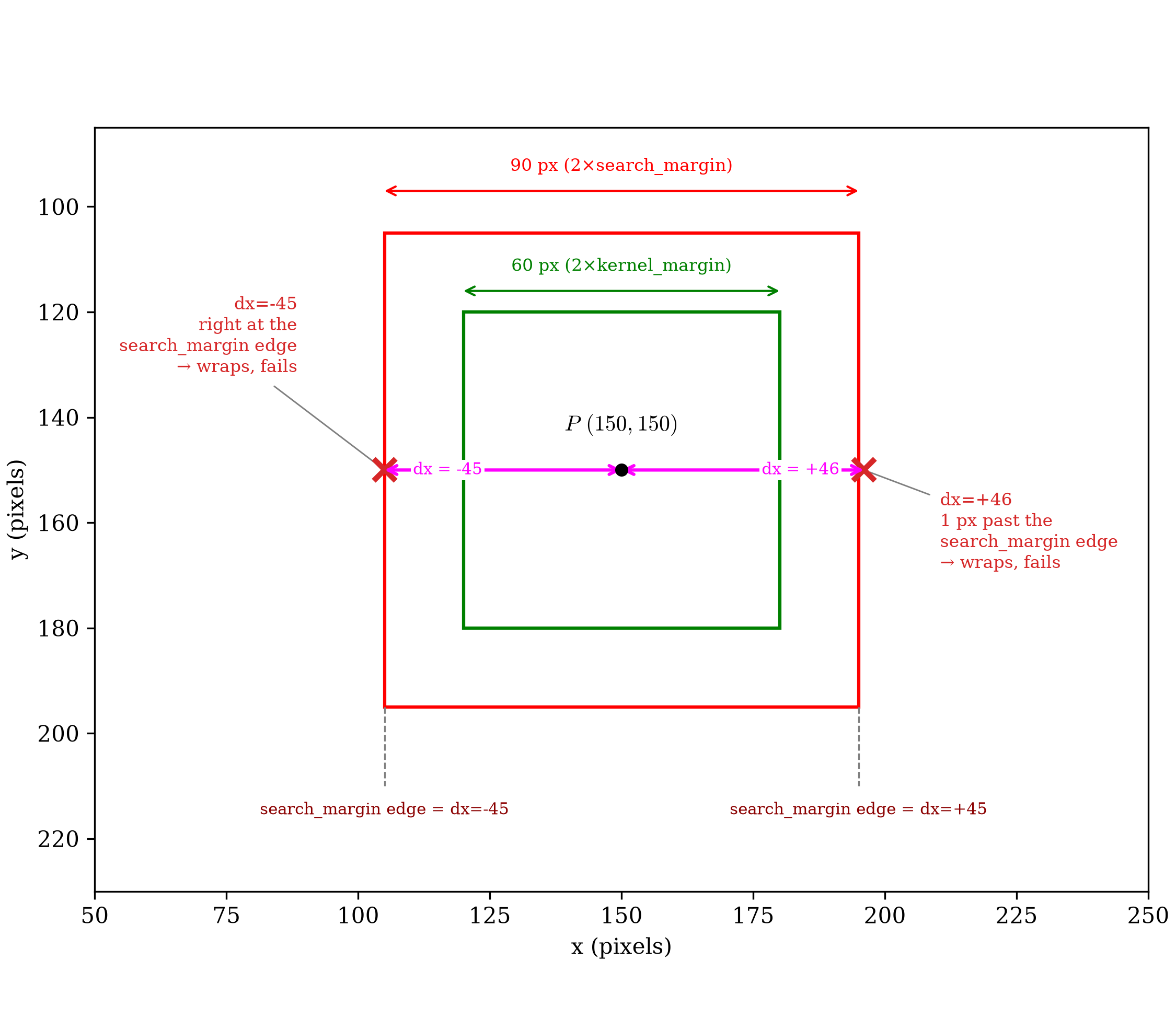
dx = -45 on the left, exactly at the search window's edge, and dx = +46 on the right, one pixel past it. At both (the red × marks), locate wraps and fails.Scope of the Fix
The old, single _window_and_pad helper did two separable jobs at
once: taper kernel/search toward zero (if windowing was given),
then zero-pad kernel up to search's own shape. Only the first job
ever needed the full search array; the second only ever read its
shape. Splitting them makes that honest: _window tapers both arrays
(unchanged from before), and _kernel_pad grows kernel up to a given
(height, width) — never search itself — gaining the centered
parameter this page is about. locate calls _kernel_pad with
centered=True.
phase_correlation —
the surface-visualization function behind every figure in Correlation
Visualization — keeps the old,
uncentered default. Every peak position already published there, all
well within the old safe range regardless of which convention computed
it, stays exactly as documented; nothing needed regenerating.
Correlation Criteria notes
the difference where its own teaching example reimplements this same
padding step.
What This Means in Practice
search_margin now means what it always should have: the full range a
true displacement can fall within, safely, in every direction. That's
progress, but it doesn't remove the underlying cost — a bigger unknown
displacement still needs a bigger search_margin, and a bigger
search_margin still means a bigger FFT at every point. Search Center
Predictions picks up exactly here: a
better initial guess than "zero displacement" shrinks how much
search_margin has to cover in the first place.
The original question — how far astronaut0 can actually be stretched
or compressed before locate breaks — is still open. This page didn't
answer it; it found and fixed something that had to be fixed first. The
interpolation confound flagged above is still there too. Both are
follow-up work, not resolved here.
recoverable_displacement_range_uncentered_demo.py
"""Reproduces `dictk.translation.locate`'s behavior before the fix
documented in Recoverable Displacement Range: kernel content anchored at
the padded array's top-left corner, not centered.

Runs live on every book build, not from a committed snapshot.
"""

from dictk.correlation import _kernel_pad, _window
from dictk.image import PixelCoordinate, read, subimage, translate
from skimage.registration import phase_cross_correlation


def locate_uncentered(
    reference_image,
    current_image,
    reference_point,
    search_center,
    kernel_margin,
    search_margin,
):
    kernel_origin = PixelCoordinate(
        x=reference_point.x - kernel_margin, y=reference_point.y - kernel_margin
    )
    kernel = subimage(
        image=reference_image,
        origin=kernel_origin,
        width=2 * kernel_margin,
        height=2 * kernel_margin,
    )
    search_origin = PixelCoordinate(
        x=search_center.x - search_margin, y=search_center.y - search_margin
    )
    search = subimage(
        image=current_image,
        origin=search_origin,
        width=2 * search_margin,
        height=2 * search_margin,
    )
    kernel, search = _window(kernel=kernel, search=search, windowing=None)
    kernel_padded, _, _ = _kernel_pad(kernel=kernel, shape=search.shape, centered=False)
    shift, _, _ = phase_cross_correlation(
        reference_image=search, moving_image=kernel_padded, normalization="phase"
    )
    return PixelCoordinate(
        x=search_origin.x + int(shift[1]) + kernel_margin,
        y=search_origin.y + int(shift[0]) + kernel_margin,
    )


if __name__ == "__main__":
    reference_image = read(path="astronaut0.png")
    p0 = PixelCoordinate(x=150, y=150)
    kernel_margin = 30
    search_margin = (
        180  # generous, fixed -- shouldn't matter, per the ratio result above
    )

    print("| dx | kernel_margin offset | expected | found | match |")
    print("|---|---|---|---|---|")
    for dx in [
        kernel_margin - 3,
        kernel_margin - 1,
        kernel_margin,
        kernel_margin + 1,
        kernel_margin + 3,
    ]:
        current_image = translate(arr=reference_image, dx=dx, dy=0)
        expected = PixelCoordinate(x=p0.x + dx, y=p0.y)
        found = locate_uncentered(
            reference_image, current_image, p0, p0, kernel_margin, search_margin
        )
        print(
            f"| {dx} | {dx - kernel_margin:+d} | ({expected.x},{expected.y}) | "
            f"({found.x},{found.y}) | {found == expected} |"
        )
recoverable_displacement_range_the_fix_cliff.py
"""Draws the reference point, its kernel (green), and its search window
(red) from The Fix in Recoverable Displacement Range, along with the
two positions one pixel past the search_margin edge where `locate`
wraps and fails.

Runs live on every book build, not from a committed snapshot.
"""

import matplotlib.patches as patches
import matplotlib.pyplot as plt

p0_x, p0_y = 150, 150
kernel_margin = 30
search_margin = 45

plt.rcParams.update({"font.family": "serif", "mathtext.fontset": "cm"})
fig, ax = plt.subplots(figsize=(7.5, 6.5), constrained_layout=True)

ax.plot(p0_x, p0_y, "o", color="black", markersize=5, zorder=8)
ax.annotate(
    "$P\\ (150, 150)$",
    (p0_x, p0_y),
    textcoords="offset points",
    xytext=(0, 18),
    ha="center",
    fontsize=10,
    zorder=9,
)

# kernel (green) and search window (red), same colors as cross_correlation.md
ax.add_patch(
    patches.Rectangle(
        (p0_x - kernel_margin, p0_y - kernel_margin),
        2 * kernel_margin,
        2 * kernel_margin,
        edgecolor="green",
        facecolor="none",
        linewidth=1.5,
        zorder=3,
    )
)
ax.add_patch(
    patches.Rectangle(
        (p0_x - search_margin, p0_y - search_margin),
        2 * search_margin,
        2 * search_margin,
        edgecolor="red",
        facecolor="none",
        linewidth=1.5,
        zorder=2,
    )
)

# two dx displacement lines, each with arrowheads at both its own ends,
# right at y=150 -- P's own row. Left: P to the dx=-45 marker. Right: P
# to the dx=+46 marker. Labels sit right on the line, in the gap between
# the kernel box and each marker, clear of the kernel box itself.
dx_y = p0_y
for x_start, x_end, label, label_x in [
    (p0_x - 45, p0_x, "dx = -45", 117),
    (p0_x, p0_x + 46, "dx = +46", 184),
]:
    ax.annotate(
        "",
        xy=(x_end, dx_y),
        xytext=(x_start, dx_y),
        arrowprops=dict(
            arrowstyle="<->", color="magenta", linewidth=1.5, shrinkA=0, shrinkB=0
        ),
        zorder=6,
    )
    ax.text(
        label_x,
        dx_y,
        label,
        ha="center",
        va="center",
        fontsize=7.5,
        color="magenta",
        zorder=7,
        bbox=dict(facecolor="white", edgecolor="none", pad=1),
    )

# one pixel past the search_margin edge, both sides -- where locate wraps
ax.plot(
    p0_x + 46, p0_y, "x", color="tab:red", markersize=10, markeredgewidth=2.5, zorder=4
)
ax.plot(
    p0_x - 45, p0_y, "x", color="tab:red", markersize=10, markeredgewidth=2.5, zorder=4
)
ax.annotate(
    "dx=+46\n1 px past the\nsearch_margin edge\n→ wraps, fails",
    (p0_x + 46, p0_y),
    textcoords="offset points",
    xytext=(35, -45),
    fontsize=8,
    ha="left",
    color="tab:red",
    arrowprops=dict(arrowstyle="-", color="gray", linewidth=0.7, shrinkA=3, shrinkB=3),
)
ax.annotate(
    "dx=-45\nright at the\nsearch_margin edge\n→ wraps, fails",
    (p0_x - 45, p0_y),
    textcoords="offset points",
    xytext=(-40, 45),
    fontsize=8,
    ha="right",
    color="tab:red",
    arrowprops=dict(arrowstyle="-", color="gray", linewidth=0.7, shrinkA=3, shrinkB=3),
)

# dimension arrows for both boxes -- kdim_y sits close to the kernel
# box's own top edge; sdim_y stays further out, above the search box
kdim_y, sdim_y = p0_y - kernel_margin - 4, p0_y - search_margin - 8
ax.annotate(
    "",
    xy=(p0_x - kernel_margin, kdim_y),
    xytext=(p0_x + kernel_margin, kdim_y),
    arrowprops=dict(arrowstyle="<->", color="green", shrinkA=0, shrinkB=0),
)
ax.text(
    p0_x,
    kdim_y - 3,
    "60 px (2×kernel_margin)",
    ha="center",
    va="bottom",
    fontsize=8,
    color="green",
)
ax.annotate(
    "",
    xy=(p0_x - search_margin, sdim_y),
    xytext=(p0_x + search_margin, sdim_y),
    arrowprops=dict(arrowstyle="<->", color="red", shrinkA=0, shrinkB=0),
)
ax.text(
    p0_x,
    sdim_y - 3,
    "90 px (2×search_margin)",
    ha="center",
    va="bottom",
    fontsize=8,
    color="red",
)

# guide lines from each search_margin edge down to a caption naming its dx value
caption_y = p0_y + search_margin + 18
for x_edge, sign in [(p0_x - search_margin, "-45"), (p0_x + search_margin, "+45")]:
    ax.plot(
        [x_edge, x_edge],
        [p0_y + search_margin, caption_y - 3],
        color="gray",
        linestyle="--",
        linewidth=0.8,
    )
    ax.text(
        x_edge,
        caption_y,
        f"search_margin edge = dx={sign}",
        ha="center",
        va="top",
        fontsize=7.5,
        color="darkred",
    )

ax.set_xlim(p0_x - search_margin - 55, p0_x + search_margin + 55)
ax.set_ylim(p0_y + search_margin + 35, sdim_y - 12)
ax.set_xlabel("x (pixels)")
ax.set_ylabel("y (pixels)")
ax.set_aspect("equal")

fig.savefig("recoverable_displacement_range_the_fix_cliff.png", dpi=300)
print("Saved: recoverable_displacement_range_the_fix_cliff.png")
recoverable_displacement_range_first_sweep_quadrant.py
"""Illustrates The First Sweep's cliff directly: a phase-correlation
quadrant figure for dx=30 (succeeds) and dx=31 (fails), the same
scenario as recoverable_displacement_range_first_sweep.py.

The correlation surface itself is always correct -- dictk.correlation.
phase_correlation() never wraps, confirmed separately. The bug lives in
locate_uncentered's downstream, skimage-based signed-shift conversion,
not in the surface. So each figure marks two positions on the Fixed
Image panel: the surface's own true peak (yellow dashed, unchanged from
phase_correlation_quadrant_plot's normal behavior), and where
locate_uncentered actually reports the point (magenta,
reported_position) -- for dx=30 the two coincide; for dx=31 the magenta
box lands entirely outside the visible search frame, off by exactly the
padded array's own width, matching Root Cause's description.

Runs live on every book build, not from a committed snapshot.
"""

from dictk.image import PixelCoordinate, read, subimage, translate
from dictk.plot import phase_correlation_quadrant_plot
from recoverable_displacement_range_uncentered_demo import locate_uncentered

if __name__ == "__main__":
    reference_image = read(path="astronaut0.png")
    p0 = PixelCoordinate(x=150, y=150)
    kernel_margin = 30
    search_margin = 150  # exactly half of astronaut0's 300px canvas --
    # search reads the whole image, no extraction-margin black of its
    # own, so the only black left is dx's own left-side gap

    kernel_origin = PixelCoordinate(x=p0.x - kernel_margin, y=p0.y - kernel_margin)
    kernel = subimage(
        image=reference_image,
        origin=kernel_origin,
        width=2 * kernel_margin,
        height=2 * kernel_margin,
    )
    search_origin = PixelCoordinate(x=p0.x - search_margin, y=p0.y - search_margin)

    for dx, label in [(30, "succeeds"), (31, "fails")]:
        current_image = translate(arr=reference_image, dx=dx, dy=0)
        search = subimage(
            image=current_image,
            origin=search_origin,
            width=2 * search_margin,
            height=2 * search_margin,
        )
        found = locate_uncentered(
            reference_image, current_image, p0, p0, kernel_margin, search_margin
        )
        # found is point-center convention (kernel_margin already added
        # back in); convert to the surface's own top-left-corner-of-
        # kernel-box, search-local convention to compare directly against
        # the surface's own peak.
        reported_local = PixelCoordinate(
            x=(found.x - kernel_margin) - search_origin.x,
            y=(found.y - kernel_margin) - search_origin.y,
        )
        path = f"recoverable_displacement_range_first_sweep_quadrant_dx{dx}.png"
        phase_correlation_quadrant_plot(
            kernel=kernel,
            search=search,
            title=f"Phase Correlation, Pre-Fix locate (dx={dx}, {label})",
            path=path,
            reported_position=reported_local,
            reported_position_label="locate_uncentered",
        )
        print(f"Saved: {path}\n")
recoverable_displacement_range_fixing_locate.py
r"""Fixing `locate`: re-runs The First Sweep's exact scenario and dx
values, this time against the real, shipped `dictk.translation.locate`
-- not `locate_uncentered` -- to show the fix directly, before the rest
of this page walks through why it was needed.

Same two reference frames as The First Sweep's own table: `current_image`'s
own absolute frame (what `locate` actually returns), and the local frame
of `search` itself, labeled "Fixed Image, frame $\mathcal{S}$" to match
Seeing the Cliff's quadrant figures above -- those figures aren't
redrawn here (they already show the pre-fix failure; this table shows
the post-fix success, numbers only).

Runs live on every book build, not from a committed snapshot. Raw HTML,
not markdown pipe-table syntax, for the same colspan reason The First
Sweep's own table needs it.
"""

from dictk.image import PixelCoordinate, read, translate
from dictk.translation import locate

if __name__ == "__main__":
    reference_image = read(path="astronaut0.png")
    p0 = PixelCoordinate(x=150, y=150)
    kernel_margin = 30
    search_margin = 150
    search_origin = PixelCoordinate(x=p0.x - search_margin, y=p0.y - search_margin)

    print("<table>")
    print("<thead>")
    print(
        '<tr><th rowspan="2">dx</th>'
        '<th colspan="2">current_image (absolute)</th>'
        '<th colspan="2">Fixed Image, frame $\\mathcal{S}$</th>'
        '<th rowspan="2">match</th></tr>'
    )
    print("<tr><th>expected</th><th>found</th><th>expected</th><th>found</th></tr>")
    print("</thead>")
    print("<tbody>")
    for dx in [0, 10, 20, 25, 29, 30, 31, 35, 40, 50]:
        current_image = translate(arr=reference_image, dx=dx, dy=0)
        expected = PixelCoordinate(x=p0.x + dx, y=p0.y)
        found = locate(
            reference_image=reference_image,
            current_image=current_image,
            reference_point=p0,
            search_center=p0,
            kernel_margin_width=kernel_margin,
            kernel_margin_height=kernel_margin,
            search_margin_width=search_margin,
            search_margin_height=search_margin,
        )
        expected_s = PixelCoordinate(
            x=(expected.x - kernel_margin) - search_origin.x,
            y=(expected.y - kernel_margin) - search_origin.y,
        )
        found_s = PixelCoordinate(
            x=(found.x - kernel_margin) - search_origin.x,
            y=(found.y - kernel_margin) - search_origin.y,
        )
        print(
            f"<tr><td>{dx}</td>"
            f"<td>({expected.x},{expected.y})</td><td>({found.x},{found.y})</td>"
            f"<td>({expected_s.x},{expected_s.y})</td><td>({found_s.x},{found_s.y})</td>"
            f"<td>{found == expected}</td></tr>"
        )
    print("</tbody>")
    print("</table>")
recoverable_displacement_range_fixing_locate_quadrant.py
"""Illustrates Fixing `locate`'s dx=31 row: the same phase-correlation
quadrant figure Seeing the Cliff drew for the pre-fix failure, this time
against the real, shipped `dictk.translation.locate`, with
`centered=True` -- the same centered kernel padding `locate` uses
internally now, via `_kernel_pad(..., centered=True)` -- instead of
`phase_correlation`'s own permanent bottom-right-only default.

Unlike Seeing the Cliff's dx=31 figure, the two boxes coincide here: the
surface's own true peak and locate's actual reported position agree,
since the fix is exactly what makes them agree past the old cliff.

Runs live on every book build, not from a committed snapshot.
"""

from dictk.image import PixelCoordinate, read, subimage, translate
from dictk.plot import phase_correlation_quadrant_plot
from dictk.translation import locate

if __name__ == "__main__":
    reference_image = read(path="astronaut0.png")
    p0 = PixelCoordinate(x=150, y=150)
    kernel_margin = 30
    search_margin = 150
    dx = 31

    kernel_origin = PixelCoordinate(x=p0.x - kernel_margin, y=p0.y - kernel_margin)
    kernel = subimage(
        image=reference_image,
        origin=kernel_origin,
        width=2 * kernel_margin,
        height=2 * kernel_margin,
    )
    search_origin = PixelCoordinate(x=p0.x - search_margin, y=p0.y - search_margin)
    current_image = translate(arr=reference_image, dx=dx, dy=0)
    search = subimage(
        image=current_image,
        origin=search_origin,
        width=2 * search_margin,
        height=2 * search_margin,
    )

    found = locate(
        reference_image=reference_image,
        current_image=current_image,
        reference_point=p0,
        search_center=p0,
        kernel_margin_width=kernel_margin,
        kernel_margin_height=kernel_margin,
        search_margin_width=search_margin,
        search_margin_height=search_margin,
    )
    # Same conversion The First Sweep's own table uses: found is
    # point-center convention (kernel_margin already added back in);
    # convert to the surface's own frame-S, search-local convention.
    reported_local = PixelCoordinate(
        x=(found.x - kernel_margin) - search_origin.x,
        y=(found.y - kernel_margin) - search_origin.y,
    )
    path = "recoverable_displacement_range_fixing_locate_quadrant_dx31.png"
    phase_correlation_quadrant_plot(
        kernel=kernel,
        search=search,
        title=f"Phase Correlation, Fixed locate (dx={dx}, succeeds)",
        path=path,
        reported_position=reported_local,
        reported_position_label="locate",
        centered=True,
    )
    print(f"Saved: {path}")